How to Localize Mobile Apps for Global Markets?
A successful global app is not simply translated. It feels familiar when users open it, navigate it, and complete a payment. That is why teams must localize mobile experiences around language, culture, device habits, pricing, and trust.
The opportunity is substantial. GSMA’s Mobile Economy 2024 reports that 4.7 billion people used mobile internet in 2023, representing 58% of the global population. These users do not behave alike. In addition, CSA Research found that 76% of online shoppers prefer product information in their own language, while 40% will not buy in another language. These findings suggest that localization influences acquisition and conversion, not only readability.
Small details matter. A date such as 03/04/2026 can mean March 4 or April 3. A payment screen may require local wallets, tax displays, or decimal formats. Even a cheerful color can carry a different meaning across markets. Data.ai’s State of Mobile 2024 also reported that consumers spent about five hours daily in mobile apps across leading markets, raising the importance of natural, reliable experiences.
Yet localization is not a guaranteed growth formula. Poor research, literal translation, or rushed testing can damage credibility. I have seen teams optimize wording while overlooking onboarding friction and regional customer support. The better approach combines local reviewers, native-language testing, analytics, accessibility checks, and continuous feedback. This guide explains how to localize mobile apps with practical discipline, while recognizing that every market requires adjustment.
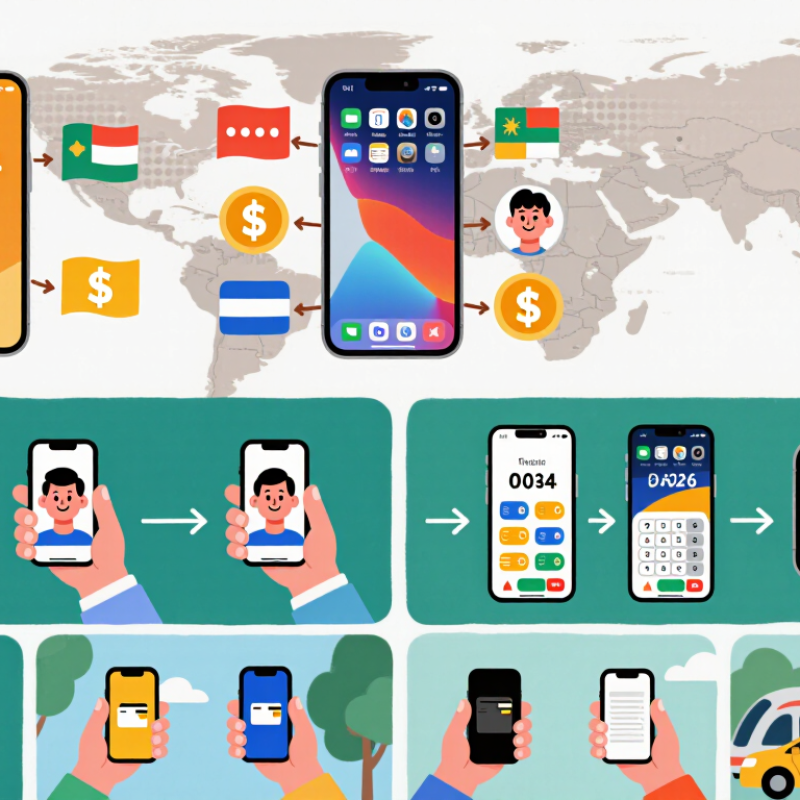
Define Target Markets, Users, and Localization Goals
Before translating a mobile app, define the target market with evidence, not assumptions. Study search behavior, device usage, payment habits, and regional language preferences. A country is not a single audience. Younger users may prefer informal wording, while professional users may expect precise instructions. Create two or three user profiles with clear needs, frustrations, and technical abilities.
Set localization goals that connect language choices to measurable results. For example, reduce onboarding abandonment, improve support comprehension, or increase completed purchases. Record the baseline before making changes. Then test localized screens with real users from the selected market. Watch how they interpret dates, buttons, icons, and error messages. Small details matter. A calendar symbol may not communicate the same action everywhere.
Keep the first release focused. Translating every screen can waste time when the main audience remains unclear. Start with the highest-use journey, such as registration or account recovery. Review feedback from native speakers, but do not treat one reviewer as the entire market. We once assumed a polite phrase would feel trustworthy, yet users found it distant and confusing. That mistake exposed a weak research step. Revise the goal when evidence changes, and document why each wording decision was made.
Audit App Content, Features, and Technical Requirements
How to Localize Mobile Apps for Global Markets?
Auditing app content is the safest starting point for localization. Review every label, error message, onboarding screen, and help article. A translation can be accurate yet feel distant. Check tone, reading level, date formats, currency display, and culturally familiar examples. In practice, short buttons often create the biggest problems. A phrase that fits in English may overflow on another device. Reviewers should test real screens, not only spreadsheets. Human review remains essential, because automated translation can miss intent, humor, or polite wording.
Features also require a regional audit. Confirm that search, payments, notifications, maps, and customer support work as expected in each target market. Some features may need different defaults or content rules. Technical preparation matters just as much. Use Unicode, flexible text containers, local time zones, and right-to-left support where needed. Test on small screens, older operating systems, slow networks, and unstable connections. Do not trust a single successful build. We have learned that hidden truncation can survive several review rounds. That weakness deserves attention.
Tips: Create a locale checklist before translation begins. Mark every text string, image, icon, and voice prompt. Ask native reviewers to explain confusing choices, not merely approve them. Test plural forms, accessibility labels, and offline behavior. Keep a record of defects, decisions, and unresolved doubts. Perfect localization is difficult. Careful evidence makes it more reliable.
How to Localize Mobile Apps for Global Markets? – Audit App Content, Features, and Technical Requirements
| Market | Primary Language & Script | Content Localization Priorities | Feature & UX Requirements | Technical Requirements | Compliance & Privacy Checks | Recommended QA Focus | Priority |
|---|---|---|---|---|---|---|---|
| United States | English, Latin | Use concise copy, US spelling, imperial units where relevant, and USD currency formatting. | Support address conventions, ZIP codes, phone number validation, and common accessibility settings. | Handle en-US locale rules, daylight-saving time changes, responsive layouts, and device permission flows. | Provide clear privacy disclosures, consent controls, data deletion options, and accessibility information. | Test text truncation, payment errors, screen readers, keyboard navigation, and different date formats. | High |
| United Kingdom | English, Latin | Use British spelling, local address formatting, metric units, and GBP currency presentation. | Validate postcodes, local telephone formats, and regional date conventions. | Support en-GB formatting, daylight-saving transitions, and local payment authentication flows. | Review UK GDPR obligations, consent language, cookie controls, and direct marketing preferences. | Check spelling variants, postcode validation, currency symbols, accessibility labels, and consent screens. | High |
| Germany | German, Latin | Allow longer German words, use formal or informal address consistently, and localize legal terminology. | Support German address fields, European decimal conventions, and local date formatting. | Support de-DE locale data, UTF-8 characters, flexible layouts, and reliable offline behavior. | Review GDPR rights, consent records, data minimization, retention policies, and tracking disclosures. | Test compound-word expansion, umlauts, legal screens, decimal separators, and consent withdrawal. | High |
| France | French, Latin | Use natural French phrasing, correct punctuation spacing, metric units, and EUR formatting. | Localize address fields, customer support wording, and subscription cancellation instructions. | Support fr-FR locale rules, accented characters, comma decimal separators, and adaptable UI strings. | Review GDPR compliance, consent wording, consumer information, and subscription transparency. | Check punctuation, gendered language, string length, voice-over labels, and localized error messages. | Medium |
| Japan | Japanese, Kanji, Hiragana, Katakana | Use culturally appropriate honorifics, concise navigation labels, local date formats, and JPY currency display. | Support Japanese address structures, era-year requirements where needed, and vertical density considerations. | Support full Unicode, Japanese font fallback, IME input, locale-aware sorting, and mobile text rendering. | Provide understandable privacy notices, consent choices, account deletion, and age-related controls where applicable. | Test character rendering, line breaks, input methods, search behavior, text expansion, and notification tone. | High |
| Brazil | Portuguese, Latin | Use Brazilian Portuguese, BRL formatting, local date conventions, and culturally relevant examples. | Support CPF or local identification fields only when necessary, Brazilian phone formats, and address structure. | Support pt-BR locale data, comma decimals, variable network quality, and efficient asset delivery. | Review Brazil’s data protection requirements, consent records, user rights, and data-transfer disclosures. | Test low-bandwidth performance, Portuguese text length, payment failures, permissions, and offline recovery. | High |
| India | English, Hindi, and additional regional languages | Plan for multilingual content, INR formatting, regional terminology, and simple language for broad accessibility. | Support varied address formats, local phone validation, multiple scripts, and low-cost connectivity scenarios. | Use Unicode, robust font fallback, flexible resource management, low-memory optimization, and offline caching. | Review applicable privacy notices, consent flows, data retention, children’s protections, and localization of support content. | Test multiple scripts, budget devices, slow networks, font rendering, input methods, and interrupted transactions. | High |
| Saudi Arabia | Arabic, Arabic script; right-to-left | Use culturally appropriate Arabic, localized terminology, Islamic calendar support where relevant, and SAR formatting. | Implement right-to-left navigation, mirrored layouts, Arabic address and phone formats, and localized support hours. | Support RTL layouts, bidirectional text, Arabic numerals where required, Unicode shaping, and locale-aware sorting. | Review local content restrictions, privacy notices, consent requirements, age controls, and data-processing disclosures. | Test RTL mirroring, mixed Arabic-English strings, truncation, date systems, notifications, and accessibility labels. | High |
| South Korea | Korean, Hangul | Use natural Korean honorifics, local date formats, KRW formatting, and concise interface language. | Support Korean address conventions, local phone validation, and appropriate identity or age-verification flows. | Support Hangul rendering, Unicode normalization, locale-aware sorting, and reliable high-density mobile layouts. | Review privacy notices, consent design, user rights, age classification, and local data-handling expectations. | Test Hangul line wrapping, keyboard input, font fallback, authentication, notifications, and accessibility settings. | Medium |
| Australia | English, Latin | Use Australian spelling, metric units, AUD currency formatting, and locally understandable service terminology. | Support Australian states and territories, local postcodes, phone formats, and time-zone differences. | Support en-AU locale data, multiple Australian time zones, daylight-saving variations, and responsive layouts. | Review privacy notices, consent practices, consumer protections, and accessible communication requirements. | Test time zones, postcode validation, spelling, currency, network variation, and accessibility compliance. | Medium |
| Mexico | Spanish, Latin | Use Mexican Spanish, MXN formatting, locally familiar terminology, and appropriate regional examples. | Support Mexican address fields, local phone formats, postal codes, and region-specific service availability. | Support es-MX locale rules, variable connectivity, efficient image loading, and flexible text containers. | Review privacy notices, consent collection, account deletion, marketing preferences, and consumer information. | Test Spanish text expansion, accents, connectivity interruptions, payment states, permissions, and error recovery. | Medium |
Adapt Language, Design, Culture, and Local User Expectations
Localizing a mobile app is more than translating buttons and menus. Language must match how people actually speak, search, and make decisions. Common Sense Advisory’s 2020 study of 8,709 consumers found that 76% prefer product information in their native language. It also reported that 40% will never buy in another language. These figures make poor wording a business risk. A precise translation can still feel cold. Review error messages, onboarding steps, dates, currencies, and support instructions with native-language specialists.
Design must adapt to culture and reading habits. German text may expand significantly, while Japanese interfaces may need different spacing and hierarchy. Symbols can also change meaning. A hand gesture, color, or notification sound may feel friendly in one market and inappropriate in another. The World Wide Web Consortium recommends designing for internationalization early, not patching layouts later. That advice is easy to ignore during a rushed release. It should not be.
Local expectations include payment methods, privacy language, login behavior, and customer support hours. Baymard Institute’s checkout research commonly places online cart abandonment near 70%, showing how quickly friction can weaken intent. App teams should test realistic local journeys, including weak connections and smaller screens. Measure completion rates by market, not only global averages. Some assumptions will fail. Keep them visible, then revise them.
Implement Localized Content, Payments, Compliance, and Support
Localizing a mobile app means adapting the complete user journey, not merely translating screens. CSA Research found that 76% of online consumers prefer product information in their own language. Localized onboarding should reflect local expressions, date formats, currencies, and reading habits. Payment choices matter equally. The 2024 Global Payments Report estimated that digital wallets represented about half of global e-commerce transaction value in 2023. Offer familiar wallets, cards, bank transfers, and transparent pricing. A missing payment method can end a download journey quickly.
Compliance must be designed into the product. Map consent screens, privacy notices, age controls, tax rules, and data storage requirements by market. Keep an audit trail for each release. Local requirements can change, and a translated policy may still sound unclear. Support needs the same care. Provide local-language help, realistic response hours, and region-specific troubleshooting. A 2024 customer service survey reported that 73% of consumers expect companies to understand their unique needs. That expectation is difficult to meet without local agents or carefully tested knowledge bases.
Tips: Test checkout with local users before launch. Ask them to complete one purchase on a slow connection. Review failed payments weekly. Measure activation, refunds, support resolution, and consent completion by country. Do not assume one regional strategy fits every market. I have seen technically correct translations reduce trust because the tone felt cold. Localization remains partly judgment, not only data. Use native reviewers, compliance specialists, and real support conversations to challenge internal assumptions.
Test, Launch, Measure, and Continuously Improve Each Market
Localization should be treated as a market experiment, not a one-time translation task. The 2020 CSA Research study found that 75% of consumers prefer products in their native language. Another 40% will not buy products presented only in foreign languages. Before launch, test translated screens with native reviewers and local users. Check currency formats, date order, screenshots, onboarding steps, and support messages. Small details matter.
Launch each market with a controlled rollout. Start with a limited audience, then compare activation, retention, conversion, and crash-free sessions. GSMA Intelligence’s Mobile Economy 2024 report estimates that 4.6 billion people used mobile internet in 2023. That audience is enormous, but it is not one audience. Measure behavior by country, language, device type, and acquisition channel. A high install rate can hide weak second-week retention. Measure behavior, not assumptions.
Review results weekly and connect analytics with customer feedback. If users abandon a payment screen, inspect wording, loading time, and local payment expectations together. Translation may not be the real problem. Our first test can still be wrong. In practical localization work, teams often optimize downloads while ignoring support tickets and refund requests. Those signals reveal friction earlier. Update one element at a time when possible, document the change, and rerun the test. Continuous improvement needs discipline, but it also needs humility.
Related Posts
-
Top 10 Tips to Effectively Localize Mobile Applications for Global Markets?
-

7 Tips to Localize Mobile Apps for Global Buyers
-

How AI for Translation is Revolutionizing Global Sourcing?
-

Top Features to Look for in a Translator Machine?
-
How to Use an AI Translation Tool for Global Sourcing
-

Top AI Translation Software for Seamless Communication Worldwide?